
5 reasons why Sora is an underrated tool for online testing prep
It’s spring, so we know that chances are, your school is getting ready for testing season. During my first year of teaching, my district went 1:1 and started to implement online state testing (yes, all at once, and yes, it was pretty hectic!). I remember being asked by my administrator “How are you preparing students for this type of test?” While I wasn’t being asked to “teach to the test”, I needed to consider how I was using technology in my lessons to ensure my students would be ready with the skills they needed for this format of testing. Whether your school is already doing computer-based testing or you’re transitioning to it soon (we know the SATs already have!), here are ways Sora can help prepare your students all year long with the test-taking skills that they need to be successful.
1. Digital reading skills
When participating in online testing, students may struggle with test anxiety, lack of confidence, and/or comfortability with the device. Students are often used to reading websites where they just scan for headers or main points. But Sora allows students to immerse themselves in reading. Students can practice reading and comprehension skills with different kinds of texts and formats to build up their confidence and succeed.
2. Annotations in Sora
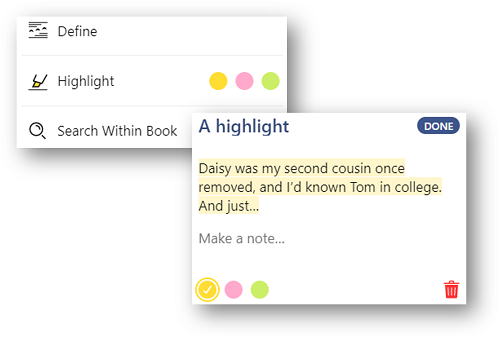
The notes and highlights feature in Sora allows students to:
- Practice the action of highlighting, which some test questions may require them to do.
- Pull out key phrases.
- Highlight context clues while reading something new.
- Look up definitions in real-time when they come up against unknown vocabulary.
- Write reflections on what they read.
- Write a summary on a specific section.
- Cite textual evidence.
3. Familiarity with other sources and formats
Reading ebooks and other formats digitally can help students build comfort before a test and practice literacy skills.
Magazines
Magazines can teach students to read fiction and nonfiction articles, identify bias in current events, and interpret infographics and other graphs.
Graphic novels
Graphic novels utilize visual imagery that can help students with comprehension and tone recognition.
Nonfiction texts
Nonfiction texts allows students to practice critical thinking and analytical skills. For research, students can use texts to practice extracting and evaluating information.
4. Technology skills
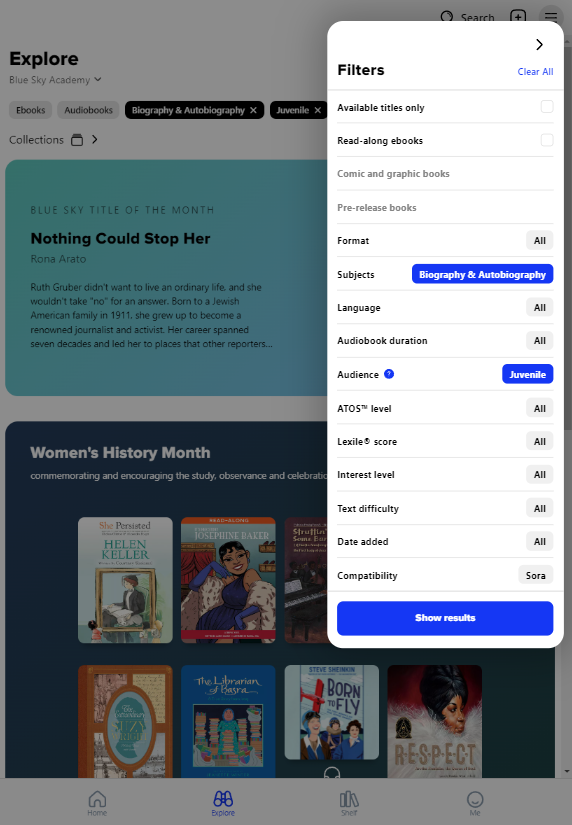
Sora allows students to prepare basic computer-based skills such as:
- Word processing
- Typing
- Clicking
- Navigating
- Utilizing icons
- Searching
- Filtering
5. Using the digital library
You can utilize your digital library to help prepare your students with the digital literacy skills they need to succeed.
Pleasure reading
Students who have access to more books and read for fun are more proficient readers and tend to score higher on tests.
Class reads
Use our Class Sets to get a book to every student to practice digital reading.
Choice reading
Allowing students to find and evaluate titles to read for class initiatives often results in higher engagement.
Online test prep essentials
Add test prep materials to your library or Method Learning Test Prep as a Sora Extra.
BONUS: After-test activities!
Your student didn’t bring anything to do after the test? Good thing Sora is readily available with a full library for them to choose from and silently read!
Published Mar 18, 2024
Last Updated Jun 17, 2026

Kristen Hein
Kristen Hein is an Account Manager who helps schools maximize the impact of Sora to increase student reading and engagement. A former history teacher, mom, and avid reader, she is passionate about connecting students with books and supporting educators in building thriving reading communities.